Suite+ bridge#
The Suite+ bridge keeps the objects in i-doit up and the assets in Suite+, the separate GRC product by i-doit GmbH, in step. Once the bridge is connected for your tenant, objects you create in i-doit up appear as assets in Suite+ and assets you create in Suite+ appear as i-doit up objects, so the same items do not need to be maintained in two places.
This page describes the i-doit up side of the bridge, the Suite+ settings surface, the per-object jump action, the single-sign-on behavior, and how data flows in both directions.
Info
This page describes the i-doit up side of a bridge that is already set up. The initial installation of i-doit up as part of the Suite+ bundle runs through the Suite+ guide to setting up i-doit up.
What the bridge does#
The bridge is a i-doit GmbH-operated middleware that connects one i-doit up tenant to one Suite+ workspace. With an active bridge you get:
- Asset / object sync in both directions, kept in step by webhook-driven create / update / delete events.
- Jump from an i-doit up object to its Suite+ asset via the Open in Suite+ widget on the object detail page.
- Jump from a Suite+ asset to its i-doit up object via an Edit in i-doit up action on the Suite+ asset detail page.
- Embedded i-doit up documentation inside Suite+: a selection of attributes is shown live on the Suite+ asset detail page.
- Single sign-on in both directions: a user logged in to Suite+ is automatically logged in to i-doit up on jump, and vice-versa. The user's i-doit up rights and permissions apply.
The exact catalogue of synced objects, plus the field-level mapping, is defined by the middleware and the Suite+ side; treat the bullets above as the user-visible contract.
Where to find it#
Open the user menu (avatar at the top-right) → Settings. At the bottom of the left sidebar, below Administration: sits the Suite+ group with a single entry Settings.
Like every other settings surface, the page is scoped to the active tenant, see Switch between tenants.
Settings page layout#
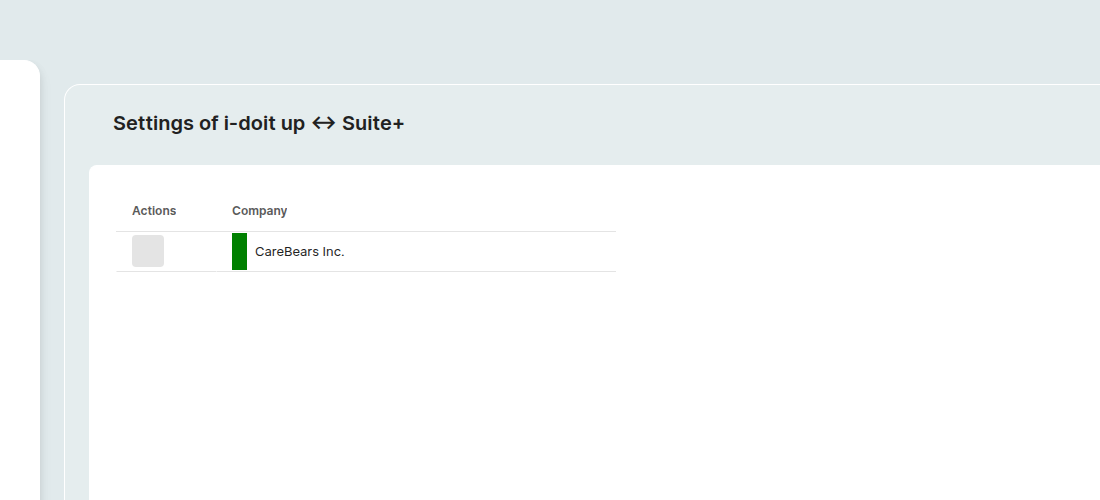
The page is a single table.
| Column | Notes |
|---|---|
| Actions | A Sync icon button per row. Not actionable in the current release: the icon is always rendered in the disabled state, see Sync below for the background. |
| Company | The tenant the row represents. A vertical color bar on the left shows the latest bridge state: green means connected and the last sync succeeded. |
A third, intentionally empty column is reserved for additional indicators.
Sync#
The current release does not expose a manual Sync trigger. The Sync icon in the Actions column is always rendered in its disabled state (hovering shows a "not allowed" cursor), and the page contains no other element that starts a sync.
Day-to-day sync runs entirely on webhooks:
- every object create, title change, and delete in i-doit up is forwarded to Suite+,
- every asset created or deleted in Suite+ is forwarded to i-doit up,
- user and tenant create / update / delete events flow both ways (registered when the bridge add-on is installed).
So once the bridge is connected, you should not need a manual sync. If your tenant ever drifts out of step, contact your i-doit GmbH representative.
Per-object jump (Open in Suite+)#
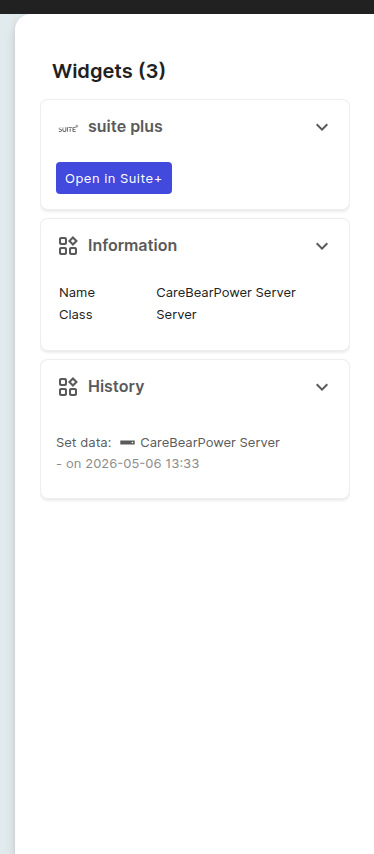
On every object detail page, a widget on the right-side Widgets pane links the object to its Suite+ counterpart.
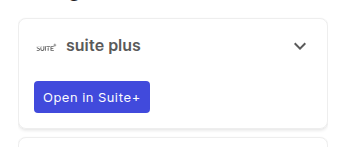
When the object has a matching Suite+ asset, the widget shows an Open in Suite+ action that opens the asset in a new tab.
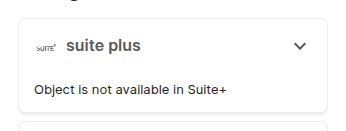
When no Suite+ asset is mapped yet (for example because the object was created before the bridge was connected, so its create webhook never fired), the widget shows the placeholder Object is not available in Suite+ instead.
The widget sits at the top of the right Widgets pane on the object detail page, ahead of the default Information and History widgets:
The reverse direction (jumping from a Suite+ asset to the i-doit up object) is offered on the Suite+ side as an Edit in i-doit up button, see the Suite+ documentation for the i-doit up bridge.
What syncs in each direction#
| Direction | What flows | Trigger |
|---|---|---|
| i-doit up → Suite+ | Object create, title update, delete. | i-doit up webhooks. |
| Suite+ → i-doit up | Asset create with a known asset type → matching object in the corresponding class. | Suite+ asset events. |
| Suite+ delete → i-doit up | Asset deletion cascades into i-doit up: the matching object is removed and the pair is dropped from the asset-id map. | Suite+ webhook. |
| Tenant lifecycle | Tenant create / rename / delete on either side is mirrored on the other (delete deactivates the Suite+ tenant). | Tenant webhooks registered on add-on install. |
Single sign-on#
Once the bridge is active for a tenant, sessions are exchanged automatically:
- Opening i-doit up while logged in to Suite+ logs you in as the corresponding i-doit up user; your i-doit up rights and permissions apply.
- Opening a Suite+ asset from the Open in Suite+ widget logs you in to Suite+ as the corresponding user.
Mechanically, clicking Open in Suite+ opens a new tab on the matching Suite+ workspace (the subdomain pattern is <tenant>.suite.i-doit.coffee) and hands it a short-lived federated JWT issued by the bridge middleware. Suite+ exchanges the JWT for a session and redirects to the corresponding asset detail page. You never see a second login screen during a successful jump.
If the i-doit up user does not yet exist on the Suite+ side, the jump cannot complete: Suite+ returns an authentication error instead of opening the asset. The user-create webhook (registered when the bridge is installed) keeps Suite+ in step for new users, so this only affects users that already existed before the bridge was connected.
Locale follows the user#
When a Suite+ user views embedded i-doit up data on a Suite+ asset detail page, the i-doit up content is rendered in the user's Suite+ language. The bridge passes the locale (for example _locale=de or _locale=en) on every data fetch, see Profile for where the i-doit up language preference lives.
When the Suite+ entry is hidden#
The Suite+ sidebar group is contributed by the bridge add-on and is only visible on tenants that have the bridge licensed. If your tenant does not show the group, the URL above returns a Page not found: see Empty states. To activate the bridge, contact your i-doit GmbH representative; the underlying connection (endpoint URL, credentials) is not configured from this page.
Further readings#
- Add-ons, the bridge ships as an add-on and is enabled per tenant from the Add-ons surface.
- Tenants, each tenant has its own bridge.
- Notifications, the toast catalog where bridge events surface.
- Rights and permissions, controls who can reach the Suite+ settings page.
- Object details page, host of the Open in Suite+ widget.
- Suite+ guide to setting up i-doit up: installation of i-doit up as part of the Suite+ bundle.
- Suite+ documentation for the i-doit up bridge, the Suite+ side of the same integration.